Shawn H. avatar

Reviewed by Shawn H. Founder, AITrustList

Last verified MethodologyAI tools are ranked by traffic signals, not paid placement.

Orca logo

Orca

Run coding AI agents in parallel across isolated worktrees

CodingFreeOpen Source
17 Views

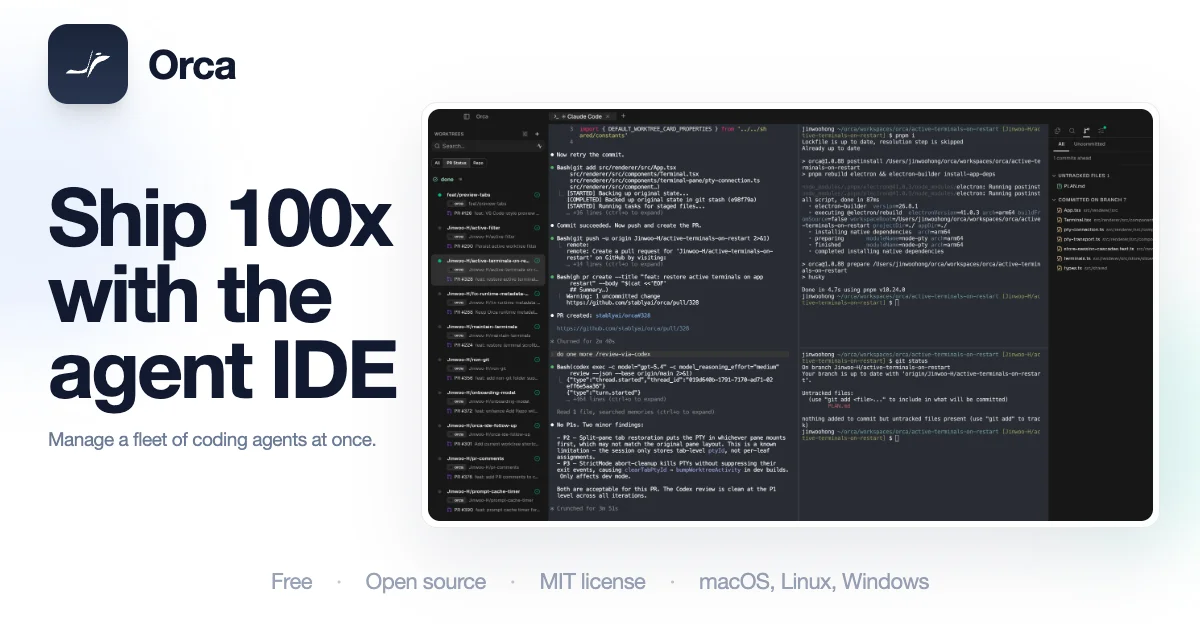
Orca is an open-source Agent Development Environment (ADE) that runs Claude Code, Codex, OpenCode and any CLI agent side by side in parallel git worktrees.

Orca alternatives
Screenshot 1

Pros & cons

Independently written by the AITrustList editorial team.

Pros

  • Free and open source with 54.7k+ GitHub stars
  • Works with Claude Code, Codex, OpenCode, Grok, Gemini, Cursor CLI, and any other CLI agent
  • Cross-platform: macOS, Windows, and Linux desktop plus iOS and Android companion
  • Parallel isolated worktrees eliminate branch juggling and stashing
  • Ghostty-style WebGL terminal with infinite splits and restored scrollback
  • Native GitHub and Linear integration for in-app PR and issue workflows

+2 more pros not shown

Cons

  • Requires bringing your own subscriptions for each supported CLI agent
  • CLI-agent-focused rather than a full traditional IDE experience
  • Mobile app still in TestFlight/preview builds for some platforms
  • Learning curve for worktree and parallel agent orchestration workflows
  • Resource intensive when running many agents concurrently
  • Mobile companion requires an initial desktop pairing to function
Orca Overview

What is Orca?

An open-source Agent Development Environment (ADE) that runs coding AI agents like Claude Code and Codex in parallel across isolated git worktrees.

How to use Orca?

Download Orca for macOS, Windows, or Linux from the official site. Pair your existing subscriptions for Claude Code, Codex, OpenCode, or any CLI agent. Spin up a workspace, run multiple agents in parallel across isolated worktrees, review and annotate AI output in the built-in editor and browser, then merge the best branch.

Core features of Orca

  • Parallel isolated git worktrees for running multiple CLI coding agents side by side
  • Ghostty-inspired WebGL terminal with infinite splits and scrollback search
  • Built-in VS Code-style file editor with autosave, quick-open, and drag-drop file support
  • Native GitHub and Linear integration for PR review, issues, and project boards
  • Real Chromium Design Mode per worktree for sending UI screenshots to agents
  • SSH worktrees with port forwarding, passphrase caching, and auto-reconnect

Target audience of Orca

DevelopersAI DevelopersBackend DevelopersFrontend DevelopersIndie Hackers

Use cases of Orca

  • #1Running multiple coding agents in parallel on different branches of the same repo
  • #2AI-assisted PR review with inline markdown annotations on agent-generated diffs
  • #3Iterating on UI design by sending real Chromium screenshots and HTML/CSS to agents
  • #4Remote development on a powerful cloud box via SSH worktrees
  • #5Monitoring and steering agents from a phone through the iOS or Android companion app

Orca Details

Orca is an open-source Agent Development Environment (ADE) designed for shipping code with AI coding agents. It runs Claude Code, Codex, OpenCode, Grok, Gemini, Cursor CLI, and any other CLI agent in parallel across isolated git worktrees, so multiple agents can work on different branches without interfering with each other. The desktop app bundles a Ghostty-inspired WebGL terminal with infinite splits and scrollback search, a VS Code-style file editor with autosave and quick-open, and a real Chromium browser per worktree for design iteration. Native GitHub and Linear integrations let you browse PRs, review agent diffs with inline annotations, open worktrees from any task, and create issues without context switching. SSH worktrees extend the same setup to a remote machine with port forwarding and auto-reconnect. An iOS and Android companion app pairs with the desktop so you can watch live agent status, check Claude and Codex usage, switch accounts, and keep terminal work moving when away from your desk. Orca is free, cross-platform (macOS, Windows, Linux), backed by Y Combinator, and has 54.7k+ stars on GitHub.


Orca Pricing

Pricing model
Free
Free
Open-source desktop and mobile build with all core agent orchestration, worktree, terminal, and GitHub/Linear features.
Free
Enterprise
Enterprise edition for teams (separate Enterprise page).
Contact for Pricing

FAQ from Orca

What is Orca?

Orca is an Agent Development Environment (ADE) for shipping code with AI coding agents, running multiple CLI agents in parallel across isolated git worktrees.

Which coding agents does Orca support?

Claude Code, Codex, OpenCode, Grok, Gemini, Cursor CLI, GitHub Copilot, and any other CLI agent can be plugged in.

Is Orca free?

Yes, Orca is free and open source, with an Enterprise edition available separately.

What platforms does Orca support?

macOS, Windows, and Linux desktops, plus an iOS and Android mobile companion app.

Where is the source code hosted?

github.com/stablyai/orca

Orca Website Traffic Analysis

Visit Over Time

Orca had 617.7K monthly visits in the latest recorded month. It is currently tracked in the Coding category on AITrustList.

Monthly Visits617.7K
Avg. Visit Duration01:35
Page per Visit2.42
Bounce Rate44.71%
Jan 2026 - Jul 2026 All Traffic

Geography

Top 5 Regions

📍Korea, Republic of
40.05%
📍China
13.21%
📍United States
11.62%
📍Brazil
5.44%
📍Taiwan
2.97%
Jan 2026 - Jul 2026 Desktop Only

Traffic Sources

Organic Search
45.60%
Direct
32.43%
Referrals
11.64%
Organic Social
9.39%
GenAI
0.54%
Mail
0.24%
Paid Social
0.07%
Display Ads
0.06%
Paid Search
0.02%
Affiliate
0.00%
Jan 2026 - Jul 2026 Worldwide Desktop Only

AI Referral Traffic

ChatGPT
74.8%
Perplexity AI
18.3%
Google Gemini
6.9%
Jan 2026 - Jul 2026 AI Engine Share Trends

Top Keywords

KeywordTrafficCost Per Click
orca433.6K$ 3.47
orca ide36.4K$ 3.45
orca ade18.7K--
orca dev7.2K--
orca ai20.3K$ 3.68

Alternative of Orca

More Orca alternatives

Customer Reviews

0.00 out of 5

Based on 0 reviews

0
0
0
0
0

No published reviews yet.