Higgsfield AI
Infrastructure for AI-powered video and image generation.
Image to videoProduct videos

Released May 20
Freemium · From $15 /month
390

Reviewed by Shawn H. — Founder, AITrustList
Last verified MethodologyAI tools are ranked by traffic signals, not paid placement.

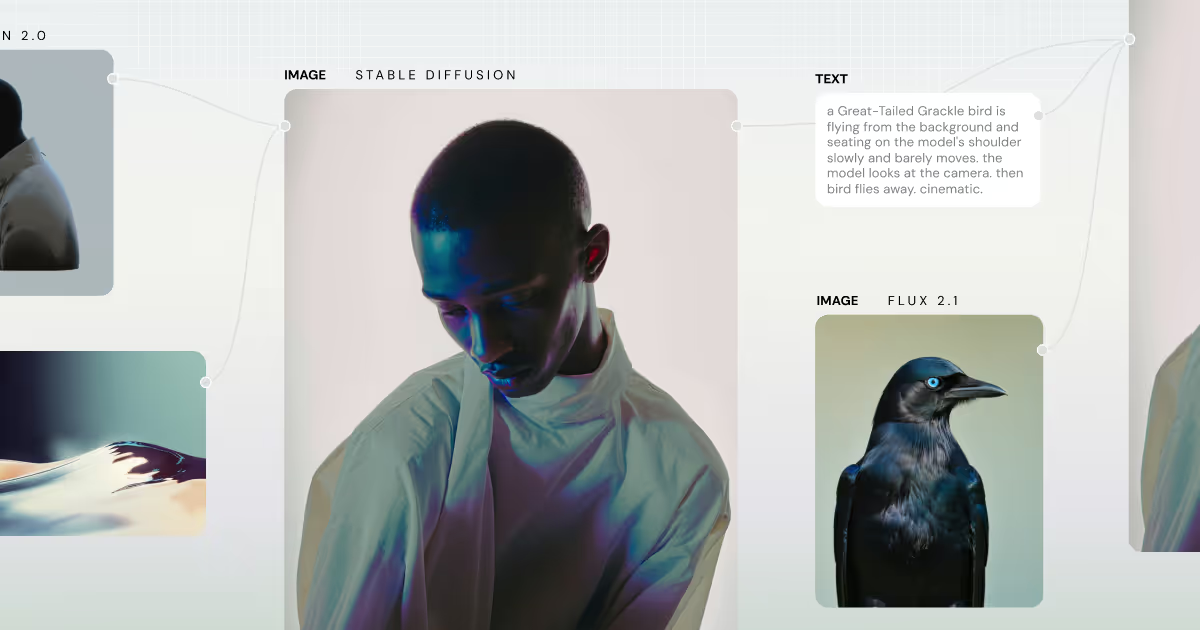
Unify AI models and editing tools in one node-based workflow
Node-based platform combining multiple AI image and video models with professional editing tools for creative teams.
Independently written by the AITrustList editorial team.
Other products in the same task, ranked by popularity.
Pricing and commercial details available on the current listing.
What it is, how to use it, and the full listing description.
Figma Weave is a node-based creative platform that combines multiple AI image and video models with professional editing tools in a single compositing workflow, now part of Figma.
Sign in at weave.figma.com, connect AI models such as Kling, Runway, Stable Diffusion, or GPT, then chain nodes for generation, inpainting, upscaling, relighting, and compositing. Save the chain as a recipe or convert it into a simplified UI that teammates can reuse without editing the underlying nodes.
Figma Weave (formerly Weavy) is a node-based creative platform hosted at weave.figma.com. It brings multiple AI image and video models together with professional editing tools in a single compositing canvas, letting creative teams build scalable production workflows without sacrificing quality.
Supported AI models include Google, Kling, OpenAI, Bytedance, Black Forest Labs, Runway, Luma, LTX, Wan, Grok, Recraft, Bria, Stable Diffusion, and Ideogram. Professional editing nodes cover invert, outpaint, crop, inpaint, mask extraction, upscale, Z depth, relight, painter, channels, and image describer.
The canvas supports multi-layer compositing with layers, type, and blend modes for full creative control. Built workflows can be automatically converted into simplified UIs that non-technical teammates can run. Pricing includes Collective and Enterprise tiers, with SOC 2 Type II security compliance.
Traffic and engagement metrics for weave.figma.com.
Figma Weave had 513.1K monthly visits in the latest recorded month. It is currently tracked in the Image editing category on AITrustList.
| Keyword | Traffic | Cost Per Click |
|---|---|---|
| weavy ai | 47.4K | $ 1.20 |
| figma weave | 56.3K | $ 1.32 |
| weavy | 43.4K | $ 1.21 |
| weave | 78.2K | $ 2.78 |
| figma weavy | 3.3K | $ 1.78 |
0.00 out of 5
Based on 0 reviews
No published reviews yet.
Questions and answers included with this listing.
Google, Kling, OpenAI, Bytedance, Black Forest Labs, Runway, Luma, LTX, Wan, Grok, Recraft, Bria, Stable Diffusion, and Ideogram.
Yes, the platform is SOC 2 Type II certified with industry-standard security controls.
Yes, video-capable models such as Kling, Runway, Luma, LTX, and Wan are available alongside image models.
Yes, workflows can be automatically converted into simplified UIs that team members can run without editing the underlying nodes.
Sign in at app.weavy.ai or through the new home at weave.figma.com.
Official and listing-specific external resources.
Published tools in the same task branch.
Infrastructure for AI-powered video and image generation.
Released May 20
Freemium · From $15 /month

AI photo editor, image & video generator in your browser
Released Aug 4
Freemium · From $1.99/month

Remix images with subject, scene, and style using AI
Released Jun 12
Freemium